

One of the first questions business owners ask when evaluating an AI sales agent is: “Will this work with the tools I already use?” It’s the right question. An AI that qualifies leads and books appointments is only useful if those appointments land in your real calendar, and those leads get logged in your real CRM — not in some separate system you have to manually sync later.
The good news is that modern AI sales agents are built with integration in mind. The more nuanced answer is that integration quality varies significantly between platforms, and “we integrate with everything through Zapier” is meaningfully different from native, two-way integration with your specific tools.
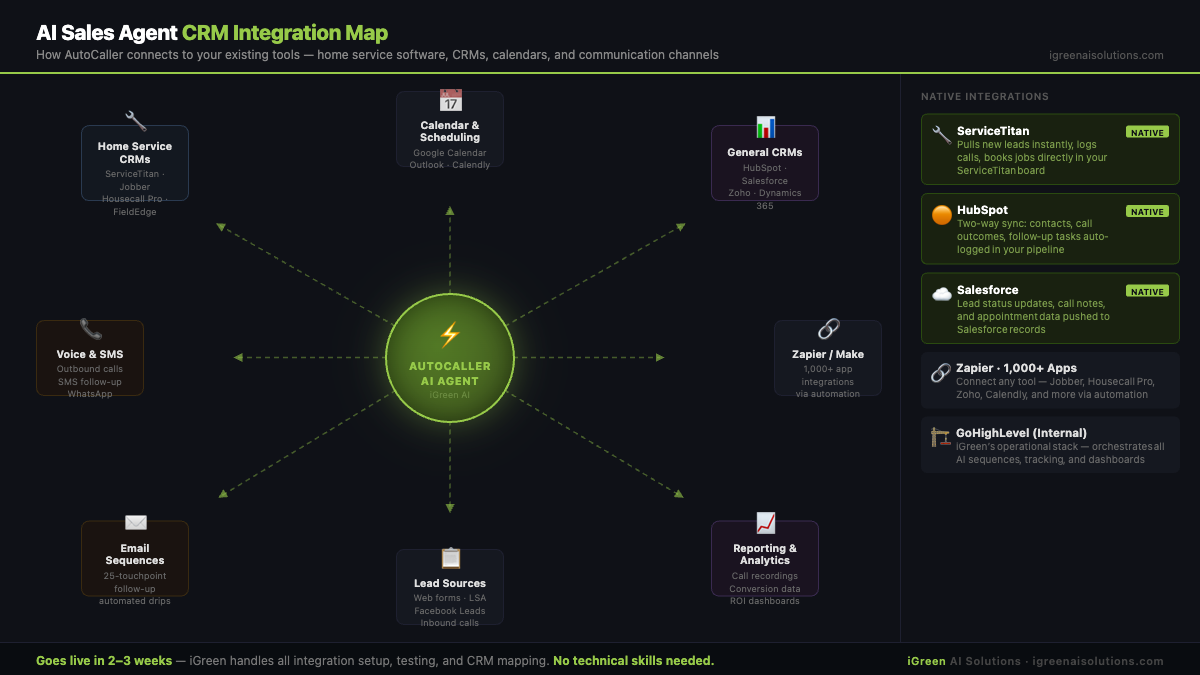
This guide covers exactly how AI sales agents connect to the tools service businesses and professional services firms use most — from field service software like ServiceTitan and Housecall Pro to mainstream CRMs like HubSpot and Salesforce to Microsoft Dynamics 365, calendar platforms, and the Zapier ecosystem.
Why CRM Integration Matters for AI Sales Agents
The value of an AI sales agent isn’t just in the conversation it has with a lead — it’s in what happens after the conversation. A well-integrated AI does three things automatically when a call ends:
1. Updates the CRM with lead data. Name, phone, email, service requested, qualifying answers, urgency, and call outcome (booked, follow-up needed, not qualified) all get logged instantly. Your team knows exactly who they’re dealing with before they ever speak to the lead.
2. Books the appointment into the correct calendar. Not a third-party calendar the AI invented — your actual calendar that your dispatchers, techs, or team already use. This means no double-bookings, no manual transfer, and confirmation emails that show your real availability.
3. Triggers follow-up sequences. If a lead doesn’t book on the first call, the AI enters a multi-touchpoint follow-up sequence — calls, SMS, emails — logged and tracked in your CRM so everyone can see the full interaction history.
When integration works well, your CRM becomes the source of truth without anyone manually entering data. When integration is missing or weak, you’re back to copy-pasting lead notes and manually creating calendar events — which defeats most of the purpose of having an AI sales agent in the first place.
Want to see how AutoCaller connects to your existing tools?
Home Service CRMs: ServiceTitan, Housecall Pro, Jobber, and FieldEdge
Home service businesses have a unique challenge: they often use field service management software that’s purpose-built for dispatching, job costing, and invoicing — not for the kind of CRM and marketing automation that most AI sales agents are designed around. Here’s how the integration landscape looks for each major platform:
ServiceTitan
ServiceTitan is the dominant software platform for larger HVAC, plumbing, electrical, and roofing companies. It handles dispatching, invoicing, technician tracking, customer history, and more. It’s powerful — and its integration ecosystem reflects that.
Native ServiceTitan integrations with AI sales agents are limited to a handful of purpose-built tools. For most AI sales agents (including AutoCaller), the integration path runs through GoHighLevel (which acts as the CRM and automation layer) combined with ServiceTitan’s API or Zapier connector. The practical result: leads captured and qualified by the AI get created in ServiceTitan as customer records, and booked appointments populate your ServiceTitan dispatch board.
The integration works cleanly — but it does require proper configuration during setup, which is part of why done-for-you services like AutoCaller include integration work as part of the setup fee rather than leaving it to you. If you’re on a DIY platform, you’ll need to set this up yourself or hire a ServiceTitan integration specialist.
Housecall Pro
Housecall Pro is popular with smaller and mid-size home service companies for its user-friendly interface and reasonable pricing. Its Zapier integration is robust, and it has a growing native integrations marketplace. AI sales agent connections typically run through Zapier (triggering new customer creation, job creation, or notification when a lead books) or through GoHighLevel as an intermediate layer.
For HVAC companies and plumbers using Housecall Pro, the integration is reliable and doesn’t require advanced technical knowledge to configure — especially with a done-for-you service handling setup.
Jobber
Jobber is widely used by landscaping, pest control, and other field service businesses. Its API is well-documented, and it connects with most major automation platforms via Zapier. AI sales agent integration follows the same pattern: lead data and booked appointments flow into Jobber through Zapier or API, creating customer records and jobs automatically.
For landscaping companies and pest control operations on Jobber, this integration path is straightforward and well-tested.
FieldEdge
FieldEdge is another field service management platform used primarily by HVAC and plumbing companies. It has API access and a Zapier integration for connecting to external tools. The integration pattern is similar to the others: new leads and appointments created by the AI flow into FieldEdge via Zapier triggers or API calls.
General CRMs: HubSpot, Salesforce, and Zoho
These are the most widely used CRMs across professional services, B2B, and mid-market businesses. AI sales agents typically integrate with them most cleanly because of mature APIs and broad Zapier support.
HubSpot
HubSpot is one of the best-supported CRM platforms for AI sales agent integration. GoHighLevel (which powers AutoCaller) has a direct HubSpot connector. Zapier adds another integration layer with hundreds of available triggers and actions.
When an AI sales agent qualifies a lead using HubSpot as the CRM, the workflow typically looks like this: lead comes in → AI calls → lead data (contact record, deal stage, qualifying notes) updates in HubSpot → if appointment booked, HubSpot deal moves to the next pipeline stage and a meeting is created → if follow-up needed, a task or sequence is triggered in HubSpot for the appropriate team member.
HubSpot’s free and starter tiers support basic Zapier integrations. More sophisticated two-way sync (especially custom field mapping and deal pipeline automation) works best on HubSpot Professional and above.
Salesforce
Salesforce is the most customizable CRM on the market and has the most extensive API of any platform in this guide. It also has the most complex integration landscape — Salesforce can do essentially anything, but “anything” often requires a Salesforce administrator or developer to implement.
For AI sales agent integration, Salesforce connections typically run through Zapier (for simpler setups) or via direct API for custom implementations. Lead records, activity logs, and opportunity updates all flow from the AI into Salesforce with proper configuration. If your Salesforce instance is heavily customized (custom objects, complex validation rules, permission sets), plan for additional setup time.
Zoho CRM
Zoho is popular with cost-conscious small and mid-size businesses. Its Zapier integration is solid, and Zoho has its own automation platform (Zoho Flow) for deeper integrations. AI sales agent connections follow the same general pattern as HubSpot, with lead data flowing into Zoho contacts and deals, and booked appointments appearing in Zoho Calendar.
Microsoft Dynamics 365 and Native Microsoft AI
Microsoft Dynamics 365 deserves special attention because Microsoft has been aggressively building native AI sales features into the platform — and the distinction between “Dynamics 365 AI features” and “third-party AI sales agents” matters.
What Microsoft Dynamics 365 Offers Natively
Dynamics 365 Sales Copilot (now part of Microsoft 365 Copilot) provides AI-powered features for sales teams already using Dynamics: call summaries, email drafting assistance, lead scoring, opportunity analysis, and conversation intelligence for recorded sales calls. These are valuable productivity features for enterprise sales teams using the full Dynamics ecosystem.
What Microsoft’s native AI doesn’t do: make outbound phone calls to new leads, conduct full qualifying conversations autonomously, or run multi-touchpoint follow-up sequences without a human in the loop. It’s a copilot for human salespeople, not an autonomous sales agent.
Third-Party AI Sales Agents with Dynamics 365
If you’re using Dynamics 365 as your CRM and want an autonomous AI sales agent calling and qualifying your leads, you’ll integrate through Dynamics’ API or via Zapier/Power Automate. Power Automate (Microsoft’s automation platform) is particularly capable for Dynamics integrations and can handle complex lead routing, field mapping, and notification workflows.
AutoCaller integrates with Dynamics 365 through GoHighLevel’s API connectors and Power Automate. During the setup process, we map your specific Dynamics objects (leads, contacts, accounts, opportunities) and configure the appropriate field mappings for your sales process.
Calendar Integration: Google, Outlook, and Scheduling Platforms
Calendar integration is where the “book appointments in real-time” promise either works or doesn’t. Here’s how the major platforms connect:
Google Calendar
Google Calendar is the most commonly used calendar for small and mid-size businesses and the most universally supported by AI sales agents. The AI checks your real Google Calendar availability before offering time slots to a lead, and creates a calendar event (with the lead’s details, service requested, and any notes from the qualifying call) when an appointment is booked. Confirmation emails to both parties are triggered automatically.
Microsoft Outlook / Office 365
Outlook calendar integration follows the same logic as Google Calendar. AutoCaller and most enterprise-tier AI platforms support Outlook natively. The AI reads your real availability and creates appointments that appear in Outlook the same way a manually scheduled meeting would.
Cal.com, Calendly, and Scheduling Platforms
Some businesses use dedicated scheduling platforms — Calendly, Cal.com, Acuity, and similar tools — as the layer between their calendar and their leads. AI sales agents typically integrate with these through their APIs or Zapier, either reading available slots directly from the scheduling platform or creating bookings that then sync to the underlying calendar. If you’re already using a scheduling platform your customers interact with directly, maintaining that workflow while adding AI voice qualification is usually the right approach.
The Zapier Factor: 1,000+ Integrations
Zapier is the integration glue that connects AI sales agents to essentially any business software that Zapier supports — which is over 7,000 apps as of early 2026. For AI sales agents, Zapier handles two main categories of integration:
Inbound triggers: When a new lead appears in your CRM, website form, ad platform, or any other source, Zapier detects it and sends the lead data to your AI sales agent, triggering the outbound call sequence. This is how the “AI calls within 60 seconds of form submission” actually works at a technical level — the form submission triggers a Zap, the Zap sends the lead to the AI system, and the call goes out.
Outbound actions: When the AI completes a call (whether it books an appointment, logs a follow-up needed, or marks a lead as unqualified), Zapier carries those outcomes into your downstream tools — creating records, updating fields, triggering notifications, adding tags, or starting new sequences.
One practical example: an electrical contractor using Housecall Pro for dispatching and Google Calendar for scheduling. A lead fills out a Facebook lead form → Zapier detects the new lead → AutoCaller receives the lead data and calls within 60 seconds → AI qualifies the lead and books an appointment → Zapier creates a new customer and job in Housecall Pro → the appointment appears in Google Calendar → the office manager gets a Slack notification. All of that happens automatically, without anyone touching a keyboard.
How AutoCaller Integrates: The Full Picture
AutoCaller runs on GoHighLevel (GHL) as its core platform. GHL is a comprehensive CRM, automation, and communication platform built specifically for agencies and service businesses. This gives AutoCaller native access to GHL’s integration ecosystem — which includes direct connectors for hundreds of commonly used business tools.
During the 2–3 week setup process, our team maps your complete tech stack and configures the appropriate integration path for each system you use. This typically includes:
- Lead source connections (your website forms, Facebook leads, Google LSA leads, landing pages)
- CRM integration (native GoHighLevel CRM, or sync to your existing HubSpot, Salesforce, Zoho, or other platform)
- Calendar connection (Google Calendar, Outlook, or your existing scheduling tool)
- Notification setup (SMS or email alerts to your team when appointments are booked or leads need human attention)
- Field service software sync (ServiceTitan, Housecall Pro, Jobber, FieldEdge via API or Zapier)
We don’t hand you a Zapier account and a setup guide. We build the integrations, test them with real lead scenarios, and confirm everything is working before we go live. If something breaks after launch — an API changes, a Zap fails, your CRM setup changes — we fix it as part of ongoing management. Think of it this way: when you hire an employee, you don’t expect them to set up their own computer, configure their own email, or troubleshoot their own software. That’s IT’s job. With AutoCaller, iGreen AI is the IT department, the HR department, and the trainer — all rolled into the monthly management fee. Your job is to run your business. Ours is to keep your AI employee connected, trained, and performing.
For a full breakdown of how AutoCaller compares to DIY platforms in terms of integration support and setup complexity, see our AI sales agent comparison guide. And for a clear picture of what the full cost looks like, including integration setup, see our AI sales agent pricing guide. To understand the fundamentals of how AI sales agents work, read our complete guide to AI sales agents.
Ready to Connect Your Existing Tools to an AI That Books Appointments?
Call the number below — our AI answers and qualifies your setup, then we’ll map out your exact integration path on a Zoom strategy call.
Tell our AI what tools you use — we’ll confirm we can integrate and show you exactly how it works for your business.
Industry-Specific Solutions
For electricians and plumbing companies, CRM integration is especially critical because you’re juggling service calls, dispatching, invoicing, and follow-up all in one place. AutoCaller integrates seamlessly with every major platform to keep your operations unified. Visit our homepage to learn more.